Skip to content
Submit
Home
Registration complete!
Welcome to your personal diabetes prevention journey
Your GP referred you because this works
You've taken the most important step for your health
Your digital programme is ready to start
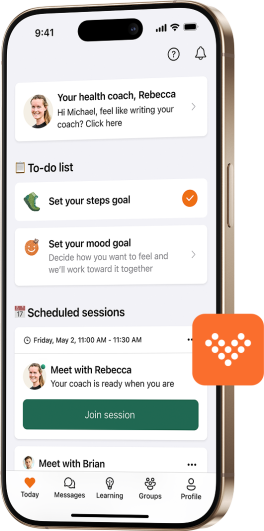
Everything you need is in the Liva app
Download the Liva app now
Registration complete!
Welcome to your personal diabetes prevention journey
You've taken the most important step for your health
Your digital programme is ready to start
Everything you need is in the Liva app
Download the Liva app now
What happens next?
Step 1:
Download the app (right now)
Get the free Liva app from your app store
Takes 2 minutes to download and install
Use the same email you just registered with
Create a secure password (we'll guide you through this)
Step 2:
Complete your profile (as soon as possible)
Complete your health assessment in the app (takes about 30 minutes!)
Schedule your video consultation with your health coach at a day and time to suit you (appointments available within 24 hours up to 6 weeks time)
Log your starting weight and other baseline info
Step 3:
Start your journey (in the coming week)
Don't forget to join your video consultation (we'll remind you!)
Set your first goals with your coach
Begin logging habits and activity
Join the community chat with people on similar journeys
Start seeing results within within weeks
Step 4:
Ongoing success (daily support)
Daily encouragement and learning articles via the app
Weekly personalised video messages from your coach to review your progress and provide guidance
Progress tracking you can see in real-time
Celebrate every achievement along the way
Keep in mind
Small changes lead to big results
Your coach is there to support, not judge
Progress isn't always linear - that's normal
Thousands have succeeded with this exact programme
Important reminders
If you experience symptoms
Contact your GP immediately if you notice:
Increased thirst or frequent urination
Unexplained weight loss
Blurred vision or fatigue
Slow-healing cuts or infections
Your GP partnership
This programme works alongside your GP care:
Continue any prescribed medications
Attend regular check-ups as scheduled
Share your progress with your GP
Programme commitment
This programme works alongside your GP care:
This is a 9-month programme for best results
Consistency matters more than perfection
Your coach will help you through challenges
Contact us if your circumstances change
Get help anytime
Phone:
0300 302 0652
(Mon-Fri, 9am-5pm)
Online resources:
Visit our
help portal
Email support:
help@livahealth.com
Your health journey starts now - we're with you every step of the way.
Your health journey starts now - we're with you every step of the way.